
Discovered Apps
Review and manage applications accessed by employees that aren't formally connected to Iden.
Discovered Apps are software tools that Iden has detected your employees are using - but which have not been formally connected to Iden yet. Iden finds these by analyzing OAuth login data (for example, apps your employees signed into using their Google account).
This gives you visibility into shadow IT: tools your team is using that are outside your IT team's control and awareness.
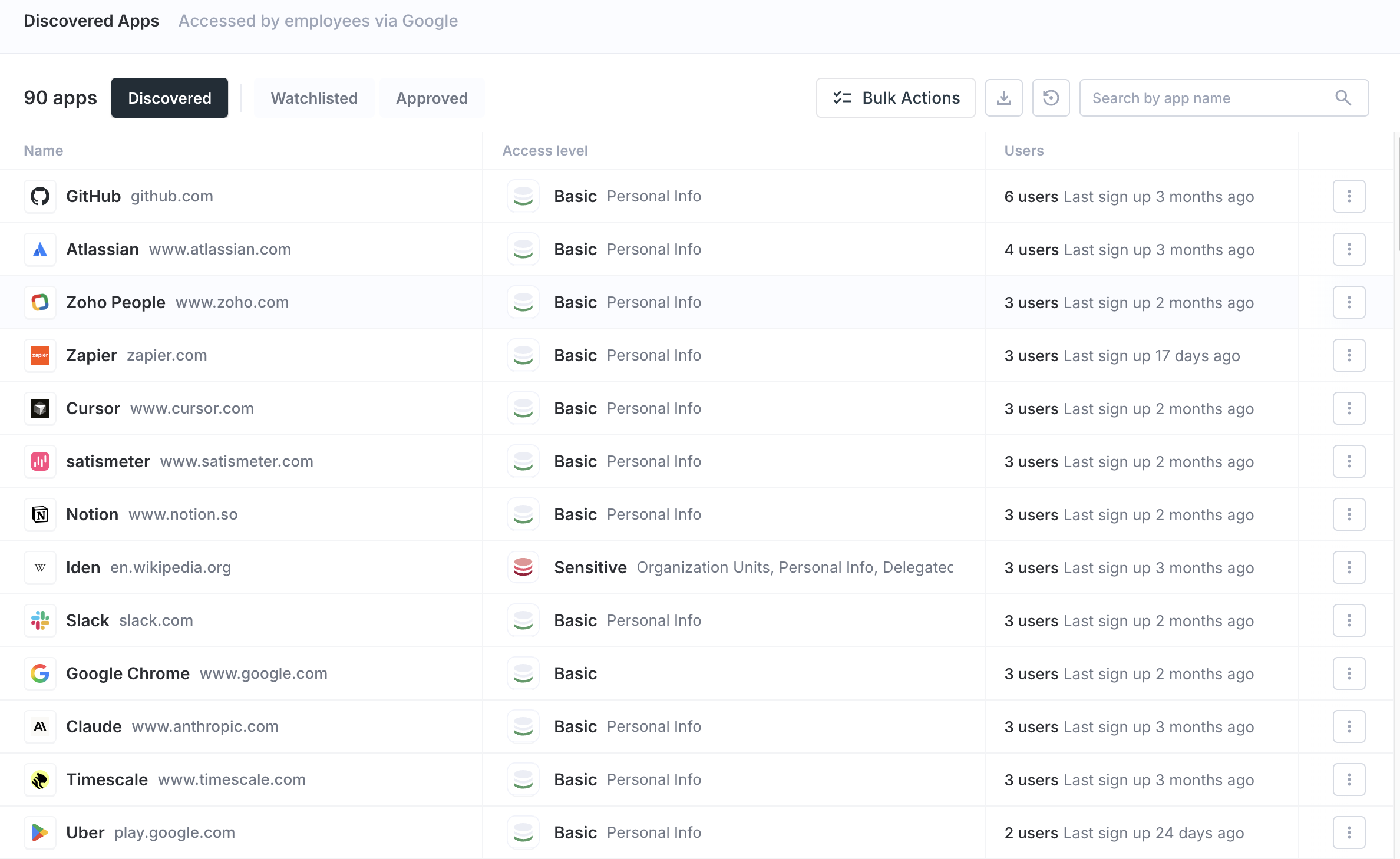
The screen below shows the Discovered Apps page:
Understanding the table
Each row represents one discovered app. Here is what each column means:
| Column | What it means |
|---|---|
| Name | The app's name, icon, and web domain (for example, notion.so) |
| Access level | The OAuth scopes (permissions) the app requested from your users. This tells you how much access the app has to your users' data. |
| Users | How many employees are using it, and when the most recent sign-up occurred |
Filter tabs
Use the tabs at the top of the table to sort apps into categories.
| Tab | Shows |
|---|---|
| Discovered | New apps that you have not yet reviewed or made a decision on |
| Watchlisted | Apps you are actively monitoring. You will be notified when new employees sign up. |
| Approved | Apps you have reviewed and confirmed are acceptable for use |
Actions you can take on each app
Click the ... menu on any app row to take action.
Approve for use
Mark the app as known and safe. You will no longer receive alerts when new employees sign up for it. The app moves to the Approved tab.
Use this for apps you are already aware of and do not need to monitor - for example, a productivity tool the whole team openly uses.
Add to watchlist
Move the app to the Watchlisted tab. You will be alerted whenever a new employee signs up. This is useful for apps you want to keep an eye on without blocking.
Manage with Iden
Formally bring the app under Iden's governance. A panel will open on the right side of the screen with two options:
The screen below shows those two options:
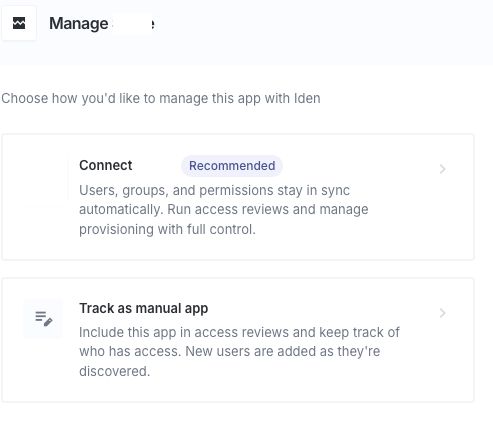
Option 1: Connect [App] (Recommended)
This starts the full app connection process. Once connected, Iden syncs (automatically copies and updates) users, groups, and permissions from the app. You will then be able to run access reviews and manage who has access.
Example: If Notion was discovered and Iden has a Notion integration available, this option starts the OAuth connection process for Notion.
Option 2: Track manually
This creates the app in Iden as a self-managed app without automatic syncing. You manage users yourself, but you can still run access reviews and create access tickets.
Use this for apps that do not have an Iden integration yet but you still want to track.
Bulk actions
You can take action on several apps at once. Select multiple apps using the checkboxes on each row, then use the bulk action dropdown to approve, watchlist, or act on all of them in one go.
Why reviewing discovered apps matters
Unmanaged apps are a common source of access risk. Here is why:
- Employees sign up with their work email and grant those apps broad permissions to their accounts.
- When someone leaves your organization, their accounts in these apps may not be removed.
- Sensitive company data can end up in tools your IT team does not know about.
We recommend reviewing the Discovered Apps list regularly. Moving apps from Discovered to either Managed or Approved closes these gaps and keeps your access data accurate.